

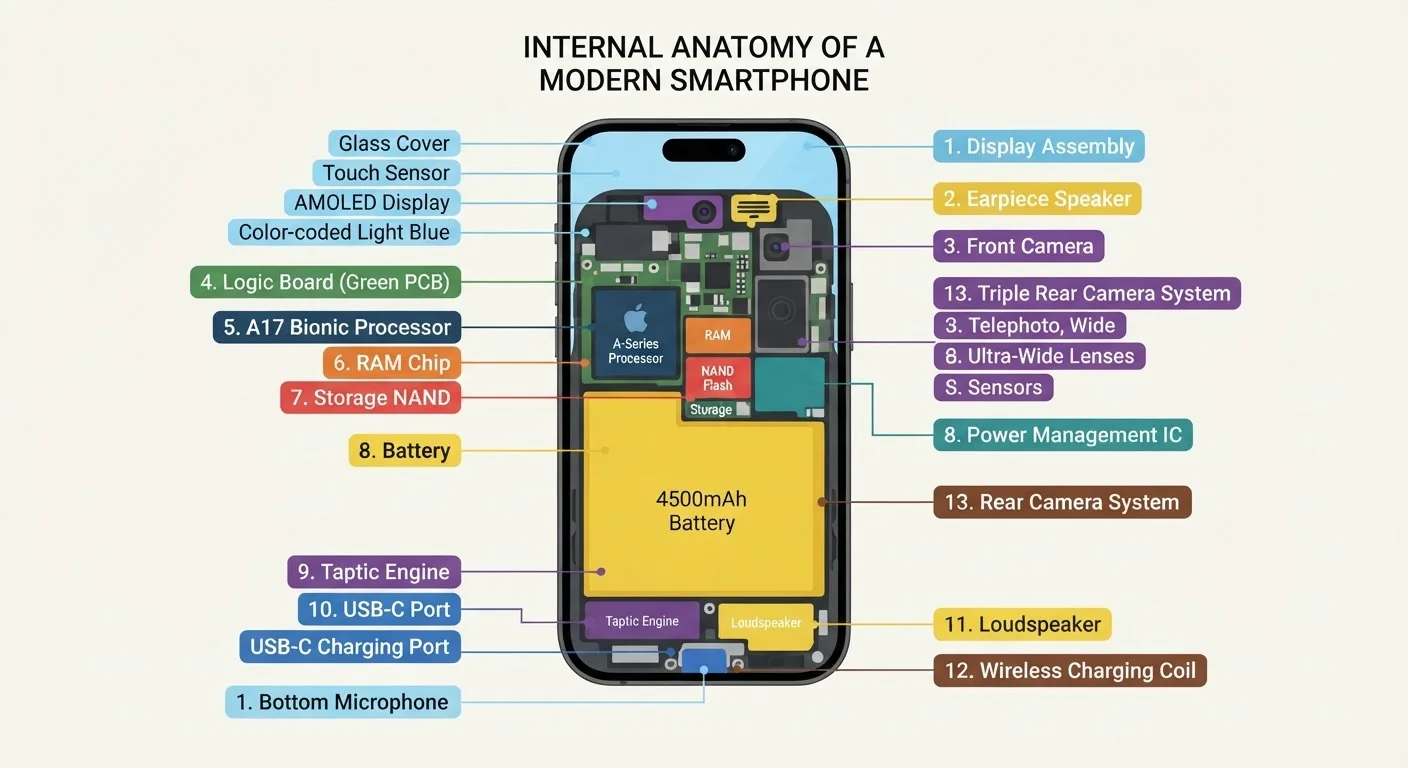
The Processor: Your Phone's Brain
The Central Processing Unit (CPU) — commonly called the processor — executes every instruction your phone carries out. When you tap an app, swipe through a menu, or send a text, the CPU is calculating billions of operations per second to make it happen.
Modern smartphones use a System on a Chip (SoC), which bundles the CPU alongside a GPU (Graphics Processing Unit, for rendering images and video), a modem (for cellular connectivity), and specialized cores for tasks like AI and image processing. Cramming all of this onto one chip keeps the phone thin, efficient, and fast.
Processor speed is measured in gigahertz (GHz) and the number of cores. More cores allow the chip to handle multiple tasks simultaneously — a bit like having several workers in a kitchen rather than just one.
Reading Processor Specs Without Getting Lost
When comparing phones, focus on the processor generation and benchmark performance rather than raw clock speed alone. A newer processor at a lower GHz rating will often outperform an older chip running faster. Manufacturers publish processor names (such as chipset model numbers) that you can quickly look up for independent benchmark comparisons.
RAM and Storage: Short-Term vs. Long-Term Memory
These two components are frequently confused, but they serve entirely different purposes.
- RAM (Random Access Memory) is your phone's active workspace. It holds data for apps you currently have open so switching between them feels instant. When you close an app or restart your phone, RAM clears completely. A phone with more RAM can keep more apps loaded simultaneously without forcing them to reload from scratch.
- Internal Storage is the permanent filing cabinet. It keeps your photos, downloaded apps, videos, and system files safe even when the phone is powered off. Storage capacity is measured in gigabytes (GB) or terabytes (TB).
A useful analogy: RAM is your desk — the bigger it is, the more you can spread out and work on at once. Storage is your filing cabinet — it holds everything whether you're working or not.
Why You Can't Always Add More Storage
Unlike a desktop computer, most modern smartphones do not allow you to swap out or upgrade storage after purchase — it's soldered directly onto the main circuit board. Some Android devices support expandable storage via a microSD card slot, but this is becoming less common. It's worth buying the storage capacity you need upfront rather than planning to upgrade later.
The Battery: Power Behind Everything
The battery stores electrical energy and supplies it to every component in your phone. Smartphone batteries are typically lithium-ion (Li-ion) or lithium-polymer (LiPo) cells. Capacity is measured in milliampere-hours (mAh) — a higher number generally means longer battery life, though actual life depends on how demanding your usage is.
The display, cellular modem, and processor are the biggest power consumers. Every time your screen lights up at full brightness or your phone searches for a cell signal, the battery drains faster.
Battery health degrades naturally with each charge cycle, gradually reducing how much total charge it can hold. Small everyday habits have a measurable long-term impact — for a deeper look, see our article on charging habits that affect battery longevity.
~500+
Charge cycles before noticeable Li-ion capacity loss
Most lithium-ion batteries begin showing measurable capacity reduction after approximately 500 full charge cycles, a figure cited widely in battery engineering literature.
~40–50%
Typical share of battery drain from the display
Studies of smartphone power consumption consistently identify the screen as the single largest power consumer, often accounting for nearly half of total battery drain during active use.
Billions
Operations per second a modern smartphone CPU performs
Contemporary mobile processors operate in the range of billions of instructions per second, enabling real-time tasks like video encoding, machine learning, and gaming simultaneously.
The Display, Camera, and Sensors
Beyond the core computing hardware, several other components define the everyday experience of using your phone.
The Display
The screen is how you interact with everything. Displays are rated by resolution (how sharp the image is), refresh rate (how smoothly motion appears, measured in Hz), and panel technology (OLED screens offer deeper blacks and better contrast than traditional LCD). The display is also usually the heaviest single drain on the battery.
The Camera System
Modern phones contain multiple camera sensors — wide, ultrawide, and telephoto — each a specialized piece of hardware. A camera sensor captures light; the lens focuses it; and the phone's image processor applies software to sharpen, brighten, and reduce noise. Megapixel count is just one factor in image quality. For a related concept, our gadget glossary explains terms like aperture and optical zoom in plain language.
Sensors
Phones pack in an array of sensors that enable features you use every day: an accelerometer detects orientation and motion, a gyroscope enables precise rotation tracking for gaming and photography, a proximity sensor turns off the screen when you hold the phone to your ear, and a GPS receiver pinpoints your location using signals from satellites. If you're curious how that last one works, our piece on how GPS finds you explains the science clearly.
How the Components Work Together
No single part of your phone operates in isolation. When you open a camera app, for instance, the CPU wakes the camera sensor, the GPU renders the viewfinder on the display, the RAM keeps the app loaded, and the storage stands by to save the photo — all within milliseconds.
Understanding these relationships makes spec sheets far less intimidating. A phone with a faster processor but less RAM might struggle with multitasking. A phone with generous storage but an aging CPU might feel sluggish running newer apps. The components work as a system, not independently.
For practical advice on keeping all these parts healthy over time, take a look at our guide to extending your device's lifespan. And once you understand the hardware, understanding the software running on top of it becomes easier — start with the difference between an app and a browser.
“The smartphone is the most complex consumer device ever mass-produced. The engineering challenge isn't just building the components — it's making them all cooperate flawlessly in a package that fits in your pocket.”
— Anand Shimpi, Founder of AnandTech, longtime semiconductor and mobile hardware analyst


